
Hi everyone!
I made some good progress in the last few weeks.
[TL:DR Everything is nicer, smoother, more juicy now. The game has some new features too. And you can sign up for a playtest!]
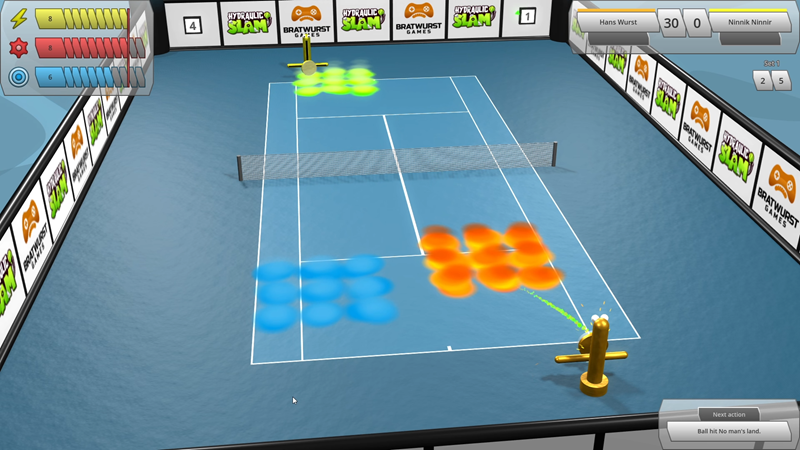
- Court effects: Every couple of hits, each corner pillar erupts either fire, water or slime, which then falls onto a random area of the court (the quarter of the court closest to that pillar) and affects energy consumption and required precision when the robot or ball interacts with the affected target fields on the court.
- They will disappear after a few hits, resetting energy consumption and required precision for the affected target fields back to default.
- Next to each corner pillar, there is a box with a number counting down the hits until the next eruption of that corner pillar (actually it’s two labels per pillar, one on the inside and one on the outside of the wall, so you don’t need to constantly rotate the camera to see the exact numbers on opposite court sides).
- 2 hits before an eruption, a pillar starts spitting out a little bit of fire, water or slime particles straight upwards. These effects become stronger 1 hit before the eruption.
- The walls around the court are now made of smaller, square-shaped segments instead of single elements going across the whole length. Each segment can display an image on the inside and another one on the outside.
- When a robot moves over the court, instead of going from 0 speed to 100% and then back to 0 instantly, it gradually accelerates and brakes in a smooth motion.
- You can now estimate to a certain extent how strong a robot is just by looking at it! The bigger its eyes, the higher its maximum precision, and the bigger its battery (located at the very bottom), the higher its maximum energy. This is visible during a match for both robots on the court as well as in the robot setup menu for your own robot.
- Changing attributes in the robot setup menu now feels much more juicy as your robot quickly bounces to the new height, width etc. when an attribute is decreased or increased. Also, when opening robot setup menu, your robot model in the preview window bounces from 0 to its current maximum values.
- A little robot is now flying through the backgrounds of game menus, which blinks its eyes every now and then and extremely discreetly follows your mouse movements. Same for your robot model in the robot setup menu. Don’t get distracted by their movements, its all part of their plan…
- Robot classes! At the beginning of a game, you can now choose from 5 different classes for your robot, each one permanently boosting your robot in a certain way, e.g. the “Battery Beast” shortens your energy recovery time and speeds up increasing your maximum energy between matches. Similar to the difficulty level or the length of machtes, the robot class cannot be changed anymore once the initial robot setup is finished, so choose wisely!
- When you choose to randomize your robot during initial setup, a random robot class is applied as well.
- Initial loading screen: When the game is started, a loading screen is now shown, featuring a black and white logo, a progress bar and information about which part of the game is currently loading. Once loading is complete, the loading screen fades away to show the main menu with the colored logo right underneath the previously black and white one.
- When navigating between menus in the game, a quick transition now occurs, where the previous screen is sliding out towards one side and the new screen is sliding in from the other side. When entering or leaving a match, the screen transitions to black before entering/leaving the match. In the settings menu, when switching settings tabs, the content is quickly fading between previous and new tab as well.
- New settings for UI scale and resolution. In case the resolution you want the game to run in is not in the resolution drop-down menu, you can even set your own, custom resolution manually in the game settings file, which will be applied automatically when the game is started the next time.
- New glow post-processing effect: Very bright objects are now causing neighboring areas to become a bit brighter as well, which produces a slight “glow” effect. This can be turned off in the graphics settings if not wanted.
- The main menu now features a few buttons on the right side, which will open your web browser with a feedback form on bratwurst.games website, the Hydraulic Slam Steam store page so you can easily wishlist the game if not done yet, or an invite to the Bratwurst Games Discord server where you will be able to discuss everything about Haydraulic Slam and future games with me and other players.
- Energy, Condition and Precision now have little icons shown in the top left corner of tennis court UI.
- New trailer and screenshots.
Apart from that, you now have the possibility to sign up for the first Hydraulic Slam Playtest, just in time for Steam Sports Fest!
[Note to self: Next time, maybe post smaller updates more frequently instead of a huge one like this after a whole 2 months…]